
Handwriting Repeater

Handwriting Repeater

Date Placeholder

Complete Guide to Using Handwriting Repeater

Transform your handwriting skills with our interactive online practice tool. Whether you're a Year 3 pupil practising letter joins, a primary school teacher looking for a quick classroom tool, or a parent supporting handwriting at home — Handwriting Repeater gives you everything you need in one free, easy-to-use platform.

Our free handwriting practice tool combines traditional writing methods with modern technology. You can draw, write, and practise on a virtual canvas while tracking your progress through innovative playback features.

What is Handwriting Repeater?

Handwriting Repeater is a comprehensive online handwriting practice platform designed to help users of all ages develop and improve their writing skills. This interactive tool provides a virtual canvas where you can practise letter formation, cursive writing, and creative lettering techniques.

The platform serves multiple purposes in the educational landscape. Teachers use it to demonstrate proper handwriting techniques on interactive whiteboards. Students benefit from the replay functionality that allows them to review their writing strokes step by step.

Our tool bridges the gap between traditional handwriting instruction and modern digital learning. Unlike static worksheets, Handwriting Repeater offers dynamic feedback and progressive skill development through hands-on interaction.

The educational value extends beyond basic letter formation. Research consistently shows that handwriting practice enhances cognitive development, improves memory retention, and supports overall learning outcomes. According to the National Handwriting Association (UK), developing handwriting skills is also essential for boosting literacy and academic confidence in children.

UK National Curriculum Alignment: EYFS, KS1 & KS2

Our Handwriting Repeater tool is specifically designed to align with the statutory requirements of the UK National Curriculum, supporting teachers and parents in delivering structured handwriting lessons across primary education levels:
  • Early Years Foundation Stage (EYFS): Facilitates early pencil control, fine motor coordination, and basic letter orientation by providing a large virtual canvas that is easy to use with touchscreens, tablets, and interactive whiteboards.
  • Key Stage 1 (KS1 - Ages 5-7): Helps young pupils learn to form lower-case letters, capital letters, and numbers (0-9) in the correct direction, orientation, and size consistency, which are core components of the KS1 statutory handwriting programme.
  • Key Stage 2 (KS2 - Ages 7-11): Supports pupils in developing a fluent, legible, and consistent joined cursive handwriting style, preparing them for statutory writing assessments (SATs) where neatness and speed are highly valued.
  • Imposition & Line Writing Tasks: For UK classrooms where repetitive writing exercises (traditional impositions or line copying) are used for discipline and muscle memory, the tool allows quick generation and visually guided practice of imposition tasks.
  • Standard UK Exercise Book Layouts: Our customisable lines (including red-and-blue tramlines and dotted grids) are carefully calibrated to replicate standard handwriting exercise books used in UK primary schools.

Key Features of the Handwriting Repeater Tool

Types of Handwriting Repeater Features
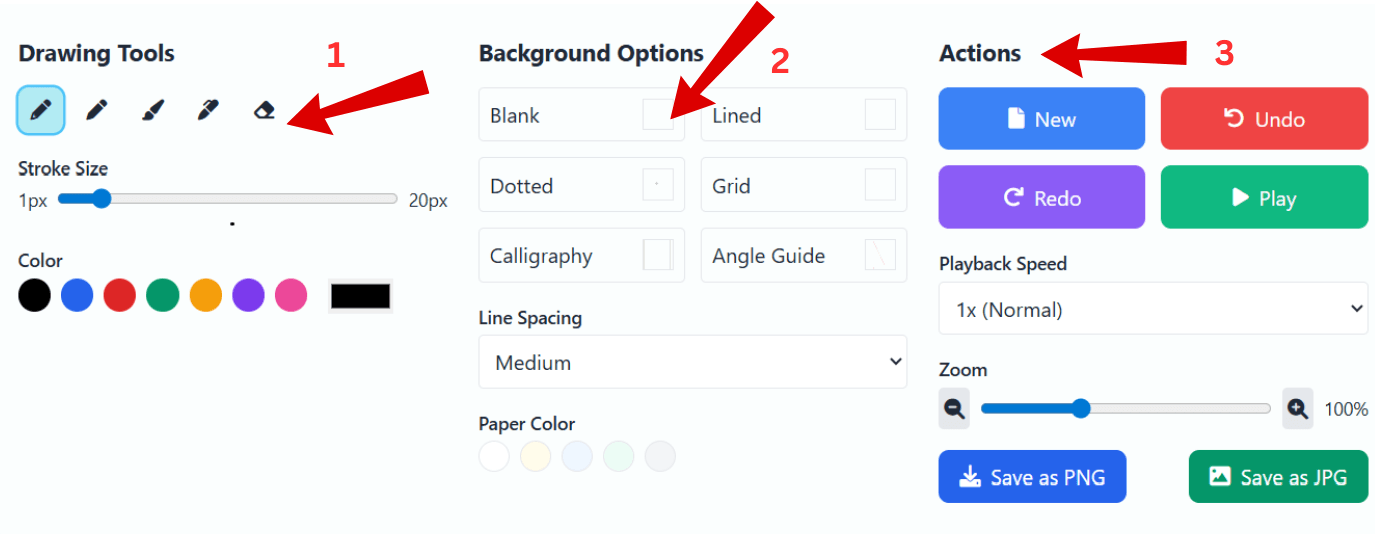
    • Advanced Drawing Tools with Full Customisation: Practise handwriting using realistic digital tools such as pencil, pen, brush, and marker. Adjust stroke size from 1px to 20px and choose from multiple vibrant colours for a natural writing experience.
    • Smart Background Options for Structured Practice: Choose from Blank, Grey Wide, Blue Dotted, Red & Blue, Black Lines, and Black Dotted backgrounds — plus customisable paper colours — to support every handwriting style and practice level.
    • Easy Undo, Redo & New Page Options: Instantly fix mistakes using Undo or Redo, or create a fresh page anytime with the New button for uninterrupted handwriting practice.
    • Playback System to Review and Improve Writing: Replay handwriting stroke-by-stroke, adjust playback speed, loop your writing, or switch to trace mode for guided practice.
    • Trace Mode for Guided Learning: Follow a moving pen with adjustable speed and delay — perfect for kids, beginners, and calligraphy learners.
    • Zoom & Navigation Controls: Zoom in/out (50%–200%) to refine letter shapes, curves, and spacing with precision.
    • Templates for Alphabet, Numbers, Cursive & Calligraphy: Use pre-built templates designed to improve letter formation, cursive flow, calligraphy strokes, and signature styling.
    • Save and Download Your Work: Export handwriting practice as high-quality PNG, JPG, or animated playback video (WEBM) — perfect for printing, sharing progress, or reviewing handwriting stroke-by-stroke.

Benefits of Using Handwriting Repeater

    Benefits of Using Handwriting Repeater
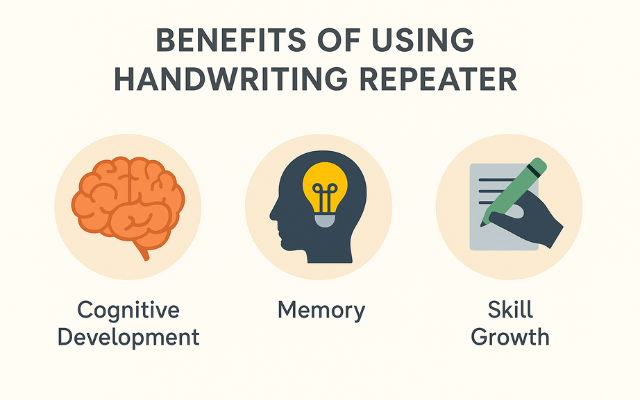
  • Enhanced Cognitive Development: Scientific research demonstrates that handwriting practice activates multiple brain regions simultaneously, supporting neural development in children and maintaining cognitive function in adults. Students who practise handwriting show improved learning outcomes across subjects.
  • Improved Memory and Learning Retention: Studies reveal that handwritten notes result in 23% better recall compared to typed notes. The physical act of writing enhances information processing and long-term memory formation, making this tool valuable for academic success.
  • Consistent Skill Development: Unlike traditional practice methods, our digital platform provides consistent feedback and unlimited practice opportunities. Users develop muscle memory and proper letter formation through repetitive, guided practice sessions.

How to Use Handwriting Repeater?

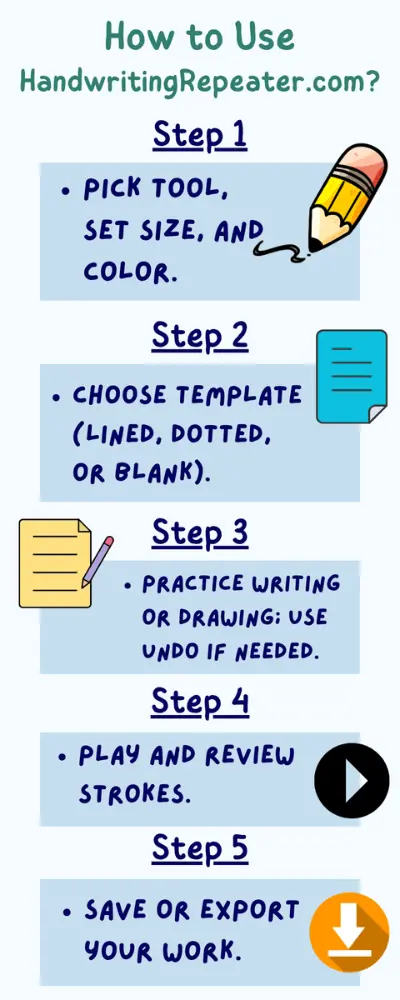
  1. Choose Pen Settings: Select your preferred pen size, type (pen, pencil, quill, none), and colour. Adjusting these helps create a comfortable and realistic writing experience.
  2. Select Practice Mode: Enable Loop Mode to repeat your writing automatically or use Trace Mode to follow guided strokes for better accuracy and control.
  3. Enter or Write Text: Type your own text using the "Type Text" feature or start writing directly on the canvas using a mouse, stylus, or touchscreen.
  4. Set Page Layout: Choose page lines, background styles, and paper colour to match your handwriting practice level, from basic writing to advanced cursive.
  5. Adjust & Start Practice: Use zoom and writing speed controls to suit your comfort. Click the Play button to start playback and practise your strokes smoothly.
  6. Save, Share & Improve: Capture your work, download it as an image, or share your progress. Use fullscreen or dark mode for a distraction-free practice session.
How to use Handwriting Repeater

Common Use Cases

  • Primary Education and Classroom Demonstrations: Teachers use Handwriting Repeater to model proper letter formation on interactive whiteboards. Students can watch repeated stroke-by-stroke demonstrations, helping them learn through visual repetition.
  • Special Education and Therapy Sessions: Therapists and special educators use customisable tools to support children with fine-motor difficulties. Adjustable stroke size, replay options, and guided tracing help learners progress at their own pace.
  • Adult Handwriting Improvement: Adults looking to refine their handwriting benefit from private, self-paced practice. The tool helps improve clarity, speed, and letter consistency without the pressure of a classroom setting.
  • Artistic Practice and Calligraphy Training: Calligraphy enthusiasts and art students use brush tools, guides, and templates to enhance lettering styles. The trace and playback features support mastering complex strokes and flourishes.

Tips for Best Results

  • Establish consistent practice routines: Dedicate 10-15 minutes daily to handwriting practice for optimal skill development. Short, frequent sessions prove more effective than lengthy, infrequent practice periods.
  • Focus on proper posture and grip: Maintain good posture and proper writing grip even when using digital tools. These habits translate to improved real-world handwriting performance.
  • Utilize replay functionality effectively: Watch your writing replays critically, identifying specific areas for improvement. Focus on one aspect at a time, such as letter spacing or stroke consistency.
  • Progress from basic to advanced techniques: Start with fundamental letter formation before advancing to cursive writing or artistic lettering. Building strong foundations ensures long-term success.
  • Combine digital practice with traditional writing: Use Handwriting Repeater to supplement, not replace, traditional pen-and-paper practice. The combination reinforces learning through multiple sensory channels.

Frequently Asked Questions

Q: Is Handwriting Repeater suitable for all age groups?
A: Yes, our tool accommodates users from primary school age through adults. The adjustable settings and various difficulty levels make it appropriate for different skill levels and learning objectives.

Q: Can teachers use this tool for classroom instruction?
A: Absolutely. Many educators use Handwriting Repeater on interactive whiteboards for whole-class instruction. The replay feature is particularly valuable for demonstrating proper letter formation techniques to students.

Q: How does handwriting practice benefit cognitive development?
A: Research shows handwriting engages multiple brain regions simultaneously, supporting neural development in children and maintaining cognitive function in adults. Regular practice improves memory, learning speed, and idea generation.

Q: Can I save and track my progress over time?
A: You can export and save your practice as PNG, JPG, or video — perfect for keeping a record of your progress. While the tool does not store sessions automatically, saving your work regularly lets you track your own improvement over time.

Q: Is there a cost to use Handwriting Repeater?
A: The basic Handwriting Repeater tool is completely free to use. All core features including writing tools, templates, and replay functionality are available without charge.

Conclusion

Start your handwriting improvement journey today with Handwriting Repeater. Whether you're supporting a child's educational development, enhancing your professional appearance, or exploring artistic expression, our comprehensive tool provides everything needed for success.

The combination of traditional handwriting benefits with modern technology creates an optimal learning environment. Research-backed features support cognitive development while interactive tools maintain engagement throughout the learning process.

Join thousands of students, teachers, and lifelong learners who have discovered the advantages of digital handwriting practice. Experience the difference that consistent, guided practice makes in developing beautiful, legible handwriting.

Begin your free practice session now and discover how Handwriting Repeater can transform your writing skills. With unlimited practice opportunities and professional-quality tools, there's never been a better time to invest in your handwriting development.

Regular handwriting practice is most effective when paired with structured resources. You can explore handwriting practice sheets generator to create personalised worksheets that support consistent skill development.

Explore Our Other Handwriting Tools

Enhance your learning with our full suite of handwriting and pre-writing practice tools, designed for all ages and skill levels.

Latest Handwriting Blog Articles

Get In Touch

Your feedback means a lot to us! If you have any questions, ideas, or just want to tell us what you think about our handwriting tool, we're all ears – get in touch today.

Email

support@handwritingrepeater.com

Follow Us